Baran Shajari
Human–AI Research & UX/UI Design
Toronto, Canada

Year
2025-2026
Role
UX researcher & prototype designer
Timeline
2025-2026
Team
Research team
METHODS & Tools
Figma, FigJam, Framer, Autodesk, Cursor, Xcode, Video Recording, Physical prototyping, Landscape review, Literature Review, User Story, Persona, Affinity Diagram, User Journey, Low-fidelity prototyping, High Fidelity Prototyping, Wizard-of-Oz Testing, Interviews, Brainstorming, behavioural observation, Comparative evaluation, Quantitative/Qualitative analysis
Project Link
Overview
I designed and evaluated a child-centred robot-assisted piano learning experience intended to support young learners during independent practice.
The project combined a low-fidelity physical robot, a functional iPad prototype, usability testing, observation, and interviews to explore whether real-time feedback and embodied interaction could improve engagement, motivation, and learning efficiency.

Problem
Independent practice lacks immediate support
Young learners often struggle to practice piano independently because feedback is delayed, mistakes can feel discouraging, and support may not always be available
This project explored how interaction with a child-friendly robot could provide clear guidance, encouraging feedback, and a more engaging practice experience.
The main UX question was: Can interacting with a robot make independent piano practice feel more understandable, engaging, and supportive for young children?

Design Challenge
How might a robot make independent piano practice
more supportive and engaging?
Research and discovery
CURRENT LANDSCAPE
We reviewed the current landscape of children's piano learning, tutoring robots, and robot-assisted music education to understand who needed support, what existing approaches already offered, and how success could be measured through accuracy, engagement, motivation, and learning efficiency.

LITERATURE REVIEW
Learning from existing research
As part of the qualitative UX research process, we also reviewed relevant literature to understand broader patterns in music learning, motivation, feedback, and human-robot interaction. This helped us identify user needs, behavioural patterns, and design opportunities that informed the direction of the experience.
Reviewed research on child learning, music education, social robots, and robot tutors to identify the interaction qualities most important for young learners.
The findings showed that the experience should provide immediate feedback, use an encouraging tone, keep the robot’s behaviour simple and approachable, and avoid movements or responses that distract from learning. These insights guided the robot’s appearance, feedback style, interaction flow, and usability-testing criteria.
Based on these readings, we also developed interview questions to explore children’s reactions to the robot’s appearance, feedback, placement, and overall interaction.
PRIMARY UX RESEARCH
Observing learners in their real practice environment
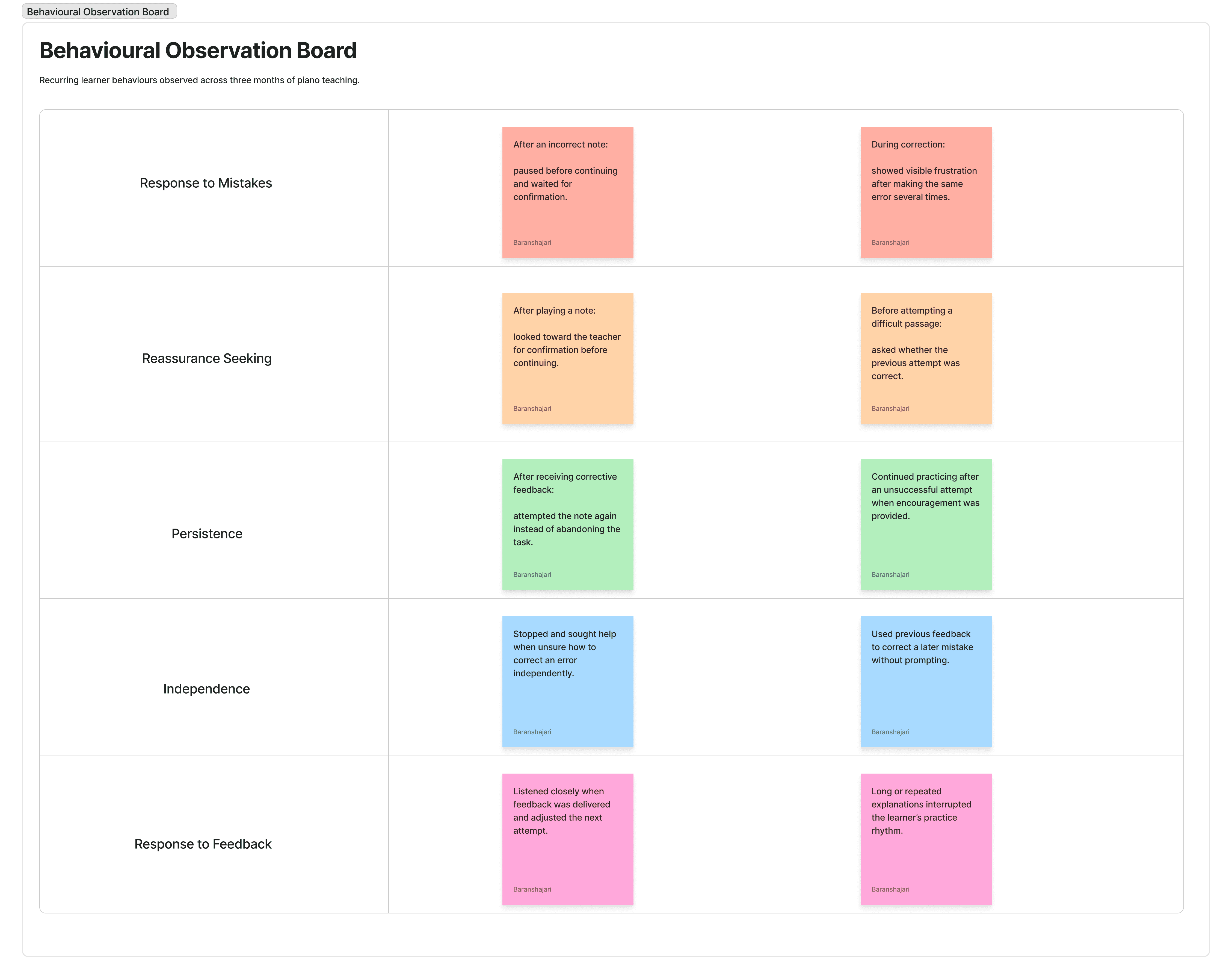
Alongside the literature review, I spent three months directly observing students during regular piano teaching sessions. Because these observations happened in a familiar learning environment, I could see behaviours that may not always come through in an interview such as how learners responded to mistakes, when they looked for reassurance, what caused frustration, how long they persisted, and when their attention or motivation began to shift. Rather than focusing only on whether a student played a note correctly, I paid attention to the behaviours surrounding the task: confidence, independence, persistence, reactions to correction, and the type of feedback that helped a learner continue.
WHAT I OBSERVED
RESPONSE TO MISTAKES — How learners reacted when something went wrong.
NEED FOR REASSURANCE — When learners looked for confirmation or encouragement before continuing.
PERSISTENCE — Whether they retried independently or became discouraged.
INDEPENDENCE — How comfortable learners were continuing without immediate teacher guidance.
RESPONSE TO FEEDBACK — How different forms and tones of correction affected motivation and behaviour.
These recurring behaviours gave us a more grounded picture of the learner than demographics alone could provide.
RESEARCH SYNTHESIS & Brainstorming
Brainstorming and bringing the evidence together
We brought together findings from the literature review and recurring behaviours from three months of direct observation. I then worked with my research collaborator to review the evidence, compare interpretations, and brainstorm which behaviours appeared consistently enough to influence the design.
We used an affinity map to organize the observations into recurring themes around confidence, motivation, independence, persistence, frustration, reassurance, and response to feedback. This helped us move from individual observations to broader behavioural patterns that could meaningfully shape the learner experience.
LITERATURE REVIEW + DIRECT OBSERVATION + Brainstorming
↓ BEHAVIOURAL PATTERNS ↓ PERSONAS
The goal was not to create fictional profiles based on age or personality. We focused on behavioural patterns that could change how the experience should respond.

Affinity Map / Research Synthesis
PERSONAS
Designing for different learner behaviours
Our research synthesis revealed that learners differed less by demographics and more by how they responded during practice, particularly in their confidence, independence, persistence, need for reassurance, and response to feedback.
From these patterns, we developed two research informed behavioural personas. Rather than representing specific children, each persona captures a recurring way of approaching independent piano practice and helps us understand where the experience may need to respond differently.


The personas helped us move from 'designing for children' in general to designing for different ways children actually experience practice.
HOW THEY INFORMED THE DESIGN
These personas became reference points for the next design stages. When defining the learner journey, feedback behaviour, interface states, and robot responses, we could ask whether the experience supported both types of learner rather than optimizing for only one behaviour pattern.
User Story
Translating persona needs into product requirements
The personas helped us move from broad behavioural patterns to specific design needs. We translated those needs into user stories so each interaction decision could stay grounded in what the learner was trying to accomplish during practice.
USER STORIES
As a reassurance-seeking learner, I want immediate confirmation after uncertain attempts so I can keep practicing without losing confidence
As a learner who becomes discouraged by repeated mistakes, I want corrective feedback to be encouraging and actionable so I know what to try next.
As an independent learner, I want feedback to be concise so I can correct the mistake without breaking my practice flow.
As a learner building confidence, I want to see clear signs of progress so I can recognize improvement and stay motivated.
As a learner practicing without a teacher present, I want support only when I need it so I can become more independent over time.
User journey
Looking at the whole practice experience
The experience does not begin and end with a feedback message. A learner moves through a sequence of preparing, playing, making mistakes, receiving feedback, retrying, progressing, and completing a practice task.
PROCESS
For each stage of the practice session, I consider the stage, learner action, thoughts, emotions, pain points, and opportunities.
Mapping the journey helps identify when feedback should be immediate, where interruption should be minimized, and where the system can reinforce progress.

WHAT THIS INFORMED
The journey helps determine which moments need explicit interaction states and which should remain part of a continuous practice flow.
INTERACTION DESIGN
Designing the Human–Robot Interaction
After understanding the problem space, we translated the research into a small set of behaviours the robot needed to support during independent piano practice.
PASSIVE INITIALIZATION
The robot initiates the interaction when the learner is ready to practice.
REAL-TIME FEEDBACK
The robot responds while the learner plays, reinforcing correct notes and identifying mistakes.
ERROR CORRECTION
When the learner struggles, the system provides clearer corrective guidance to help them continue.

From interaction concept to testable prototype
To evaluate the interaction in a realistic piano practice setting, we built a low-fidelity physical robot and paired it with a supporting iPad experience. The goal was to test the core interaction before investing in more complex robotics hardware. The physical robot established presence, scale, and positioning beside the piano, while the iPad helped simulate functionality that the low-fidelity hardware could not yet perform. Together, they gave us a practical way to test the interaction with learners.

We began with a low-fidelity prototype using Adobe tools to explore the robot’s size, appearance, and position relative to the child and piano. We then used Wizard-of-Oz prototyping, with a researcher manually controlling the robot’s arm movements to simulate future autonomous behaviour and observe how children responded.

Functional robot prototype
Building on what we learned from the low-fidelity prototype, we developed a functional robot tutor and paired it with a simple C++ application. The system listened to the child’s piano playing, identified the notes being played, and triggered immediate feedback through the robot.
Correct notes were reinforced with encouraging responses, while mistakes prompted gentle guidance and another opportunity to try. We designed the interaction to feel supportive rather than corrective, with clear feedback, simple language, low cognitive load, and easy recovery from errors.

EVALUATION PLAN
Defining how we would evaluate the experience
Once we had a testable prototype, we defined how we would evaluate both the learning outcome and the learner’s experience.
The evaluation combined structured interviews, behavioural observation, number of mistakes, and completion time.
Together, these measures helped us understand both what changed in performance and how the interaction felt to the learner.

TESTING WITH LEARNERS
Putting the prototype in front of learners
We evaluated the prototype in a piano practice setting, comparing independent practice with robot-assisted practice. During the sessions, we observed how learners responded to the robot, recorded behavioural patterns, and collected performance measures. We also followed the sessions with structured interview questions about their experience.

Wizard-of-Oz testing in the piano-practice setting.
What we learned from the study
The usability evaluation suggested that the robot-assisted experience improved both task performance and engagement.
The children made an average of five mistakes while practicing alone and an average of two mistakes while practicing with the robot, representing a 60% reduction in errors.
Average completion time decreased from 12.5 minutes without the robot to 8.5 minutes with the robot, representing an approximately 32% improvement in efficiency.
The tone of feedback mattered as much as the feedback itself
One of the strongest lessons from the original Human–Robot Interaction testing was that children reacted not only to whether the feedback was correct, but to how the robot delivered it. A technically accurate response could still feel discouraging if its tone or delivery was wrong.
FROM: “Did the system identify the mistake?”
TO: “How should the system communicate the mistake so the learner still wants to continue?”
This became an important design principle for the digital experience as well: corrective feedback should be clear without feeling punitive, while positive feedback should reinforce progress without unnecessarily interrupting practice.
Accessibility
Future Steps: Making feedback clear for more than one kind of user
Accessibility is part of the interaction design, not something I want to check only after the screens are finished. For a learning experience, feedback needs to remain understandable even when users perceive colour, motion, or controls differently.
VISIBLE FOCUS
Keyboard-accessible controls should have a clearly visible focus state.
MORE THAN COLOUR
Corrective or positive feedback should not rely on colour alone. Text, iconography, and clear state changes should reinforce meaning.
TARGET SIZE
Interactive controls should provide comfortable hit areas and spacing to reduce accidental input.
READABILITY
Typography, contrast, and hierarchy should remain readable during active practice.
MOTION
Animation should support understanding rather than become necessary to understand the interface.
CONSISTENCY
Similar actions and feedback states should behave predictably across the experience.
Reflection & Impact
This project taught me that designing for children involves more than simplifying an interface. Tone, physical presence, immediate feedback, and personality all shaped how young learners understood and responded to the robot.
The low-fidelity prototype was especially valuable because it allowed us to test the robot’s size, placement, approachability, and potential distractions before building the functional system. Usability sessions also showed that children treated the robot as a social presence rather than a passive tool-they looked toward it for validation, listened to its feedback, and attempted to interact with it.
The project strengthened my interest in designing Human-Robot interactions that feel supportive, understandable, and engaging, not simply technically impressive.
Next project
Tai Chi Studio
