Baran Shajari
Human–AI Research & UX/UI Design
Toronto, Canada

Year
2025–2026
Role
Lead UX Researcher & Interaction Designer
Timeline
2025–2026
Team
Academic research team at McMaster University. I led the participant-facing study, experimental workflow, interaction design, data collection, and UX-focused interpretation of the findings.
METHODS & Tools
Figma, FigJam, Python, Cursor, Miro, Excel, Interaction Flow Diagram, LucidChart, Controlled User Study, Questionnaire, User Interview, Behavioural Analysis, Brainstorming, Cross-Functional Collaboration
Project Link
Overview
As AI systems become more proactive, they increasingly interrupt users to request guidance, approval, or feedback. These interactions may appear efficient, but they can also create pressure and change how people perceive both the AI and their own abilities.
This project investigated the human experience of collaborating with a reinforcement-learning agent.
The study focused not only on whether users trusted the AI, but also on whether the interaction remained understandable, usable, empowering, and psychologically sustainable.

Problem
Trusting AI can have a human cost
Proactive AI systems are increasingly designed to interrupt users and request decisions in real time. These prompts are often treated as functional interface events, but they can also create cognitive pressure, reduce a person’s sense of control, and influence how users evaluate their own abilities.
Most research on human-AI collaboration focuses on trust in the system, accuracy, explainability, or task performance. Less attention is given to the emotional and psychological experience of being prompted by an AI under urgency.

Design Challenge
How might we design AI collaboration that preserves
trust, confidence, and sense of agency?
Research and discovery
We used evaluative UX research to understand how time pressure changes the experience of collaborating with an AI. By comparing the same interaction in different urgency modes, we examined how urgency influenced trust, confidence, perceived control, and ease of use.
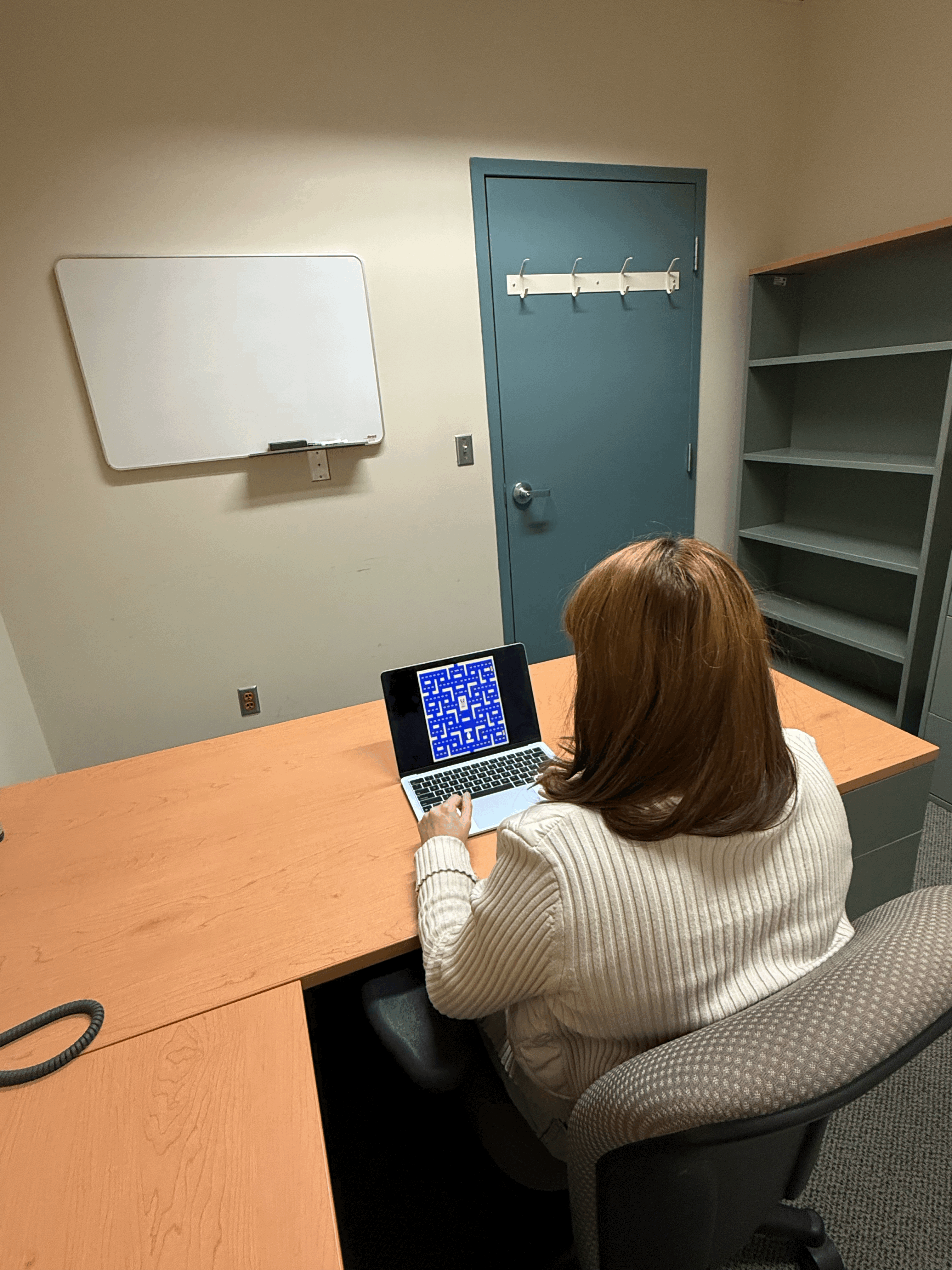
We evaluated the experience with 30 senior undergraduate and graduate students. Participants first completed a baseline task without AI assistance, then collaborated with the reinforcement-learning agent across two conditions.
Low urgency (Untimed) - no response deadline.
High urgency (Timed) - participants had five seconds to respond before their advice expired.
QUALITATIVE UX RESEARCH METHOD
Literature Review
As part of our qualitative UX research, we conducted a literature review to understand the broader context around Human–AI collaboration. We reviewed prior work on trust, confidence, time pressure, user behaviour, and demographic and cultural factors that could influence how people respond to AI systems. This helped us identify recurring challenges, gaps in existing research, and the questions we needed to explore through the interaction design and user study.
WHAT WE LOOKED AT
Trust, confidence, time pressure, user behaviour, demographic and cultural factors
WHY IT MATTERED
To understand patterns and problems already identified in Human–AI interaction research
WHAT IT INFORMED
Our research questions, interaction decisions, and user-study design
Methods & Tools
Figma, FigJam, Python, Cursor, Miro, Excel, Interaction Flow Diagram, LucidChart, Controlled User Study, Questionnaire, User Interview, Behavioural Analysis, Brainstorming, Cross-Functional Collaboration
Process
01 · USER FLOW
Mapping the user flow between human and AI
The experience is mixed-initiative: the AI normally controls Pac-Man autonomously, but periodically requests directional advice from the participant. I mapped the user flow using Figma and FigJam before designing screens so I could understand exactly when control changes hands and where the timed and untimed conditions diverge.

Swimlane flow separating AI-system behaviour from participant actions.
INTERACTION DESIGN
From research question to interaction
Before implementing the experiment, I translated the research question into an interaction model. I mapped how control would shift between the AI and participant, defined the core system states, wireframed the experience, and built an interactive Figma prototype for the timed (high urgency) and untimed (low urgency) advice flows.
The goal was to make the handoff between autonomous AI behaviour and human input clear without interrupting the participant’s understanding of the game.
02 · WIREFRAMING
I kept the first interface pass intentionally simple. At this stage I was deciding where the game should live, how an AI request should interrupt autonomous play, how directional input should be presented, and how the timed condition should communicate urgency.
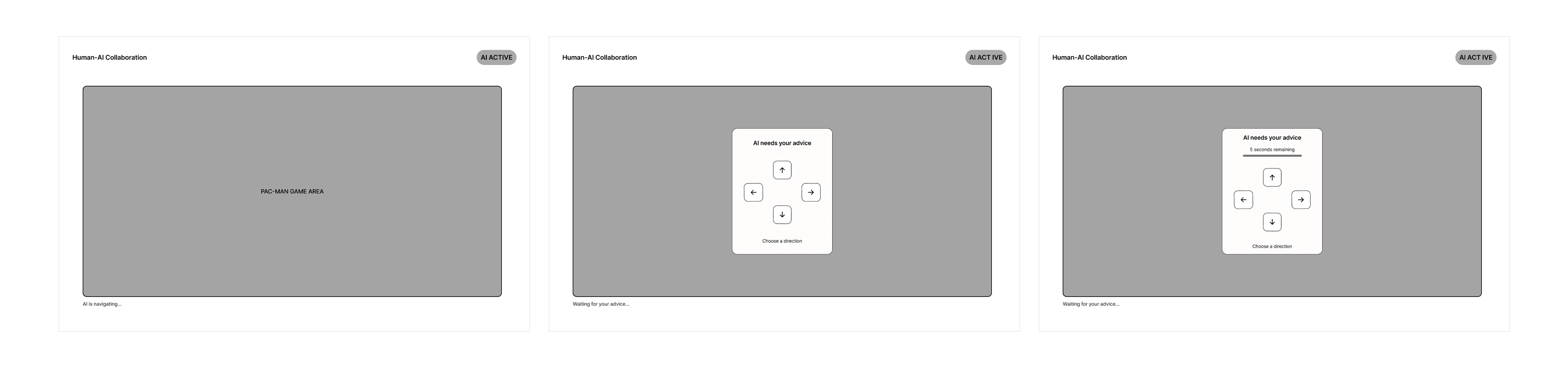
PRESERVE CONTEXT
The game remains visible while advice is requested, so the participant does not lose situational context.
MINIMAL INTERRUPTION
The advice request appears over the existing experience rather than moving the participant to a separate screen.
CONSISTENT INPUT
Timed (high urgency) and untimed (low urgency) conditions use the same directional controls; only the time constraint changes.
03 · INTERACTION STATES
Once the flow was clear, I reduced the interaction to three primary states. The interface stays deliberately stable between them, what changes is who needs to act and whether the participant is under time pressure.

Keeping the underlying game context stable made the change in interaction state-not a new page-the primary signal.
04 · INTERACTIVE PROTOTYPE
Static screens could show the states, but they could not communicate the behavioural difference between them. I connected the wireframes into an interactive Figma prototype so the timed (high urgency) and untimed (low urgency) conditions could be experienced as actual flows.
In the untimed (low-urgency) condition, the participant can respond whenever they are ready. In the timed (high-urgency) condition, a five-second countdown creates a temporary response window. Selecting a direction returns control to the AI, if no response arrives before the timer expires, autonomous play simply continues.
Interactive low-fidelity prototype · Figma
REUSABLE COMPONENTS
I created reusable directional controls, advice prompts, and timer components rather than rebuilding each state independently.
VARIANTS + STATES
Component variants supported interaction states such as default, hover, focus, pressed, and timed (high urgency) or untimed (low urgency) conditions.
TIMED BEHAVIOUR (HIGH URGENCY)
The timed prototype uses a five-second countdown and shrinking progress indicator before returning automatically to autonomous play.
SYSTEM FEEDBACK
Status messaging makes it clear whether the AI is navigating independently or waiting for human input.
Designing urgency without relying on colour
The timed (high-urgency) condition combines visible time remaining, a changing progress indicator, and motion rather than communicating urgency through colour alone. Direction controls use clear interaction states and sufficiently large targets, while system-status messaging distinguishes autonomous behaviour from moments that require participant input.
05 · DESIGN SYSTEM
I documented a lightweight set of colour, typography, spacing, and radius rules so repeated interface decisions stayed consistent. This was intentionally small as I needed enough structure to support the prototype without building an unnecessary large-scale design system.
COLOUR — Semantic colours connect system status and the visual language of the Pac-Man environment.
TYPOGRAPHY — A compact hierarchy separates prompts, instructions, and system-status information.
SPACING — An 8-point system with 4 px half-steps reduces arbitrary layout decisions.
RADIUS — Reusable corner treatments create consistency across controls, prompts, and status elements.

06 · ACCESSIBILITY REVIEW
Designing for clarity
Because one condition intentionally introduced a five-second response window, accessibility had to be considered as part of the interaction itself, not as a final check.
We reviewed the prototype around the moments that required the most attention: understanding when the AI was acting independently, recognizing when human input was needed, selecting a direction, and responding within the timed condition.
We focused on making those moments clear, perceivable, and easy to act on without changing the experimental logic.
Visible interaction states
Directional controls included clear default, hover, focus, and pressed states so users could understand what was interactive and receive feedback when taking action.
Urgency beyond colour
The timed condition did not rely on colour alone. The interface combined visible time remaining text, a countdown, and a changing progress indicator to communicate urgency in multiple ways.
Comfortable interaction targets
Directional controls were designed with sufficiently large click targets and clear spacing between buttons to reduce accidental selections.
Clear system status
Status messaging helped distinguish between moments when the AI was navigating autonomously and moments when the participant was expected to respond.
Consistent layout
The timed and untimed conditions shared the same core structure and directional controls. Keeping the layout stable reduced unnecessary cognitive load while making the change in time pressure easier to understand.
Designing around the experimental constraint
The five-second limit was itself part of the research condition, so extending or removing the timer would have changed what we were studying. Instead, we focused on making that constraint as explicit and perceivable as possible through visible timing, consistent controls, and clear system feedback.
Accessibility consideration: Reviewed the interaction against relevant WCAG 2.2 principles, particularly visible focus, target size, contrast, and avoiding colour as the only way of communicating information.
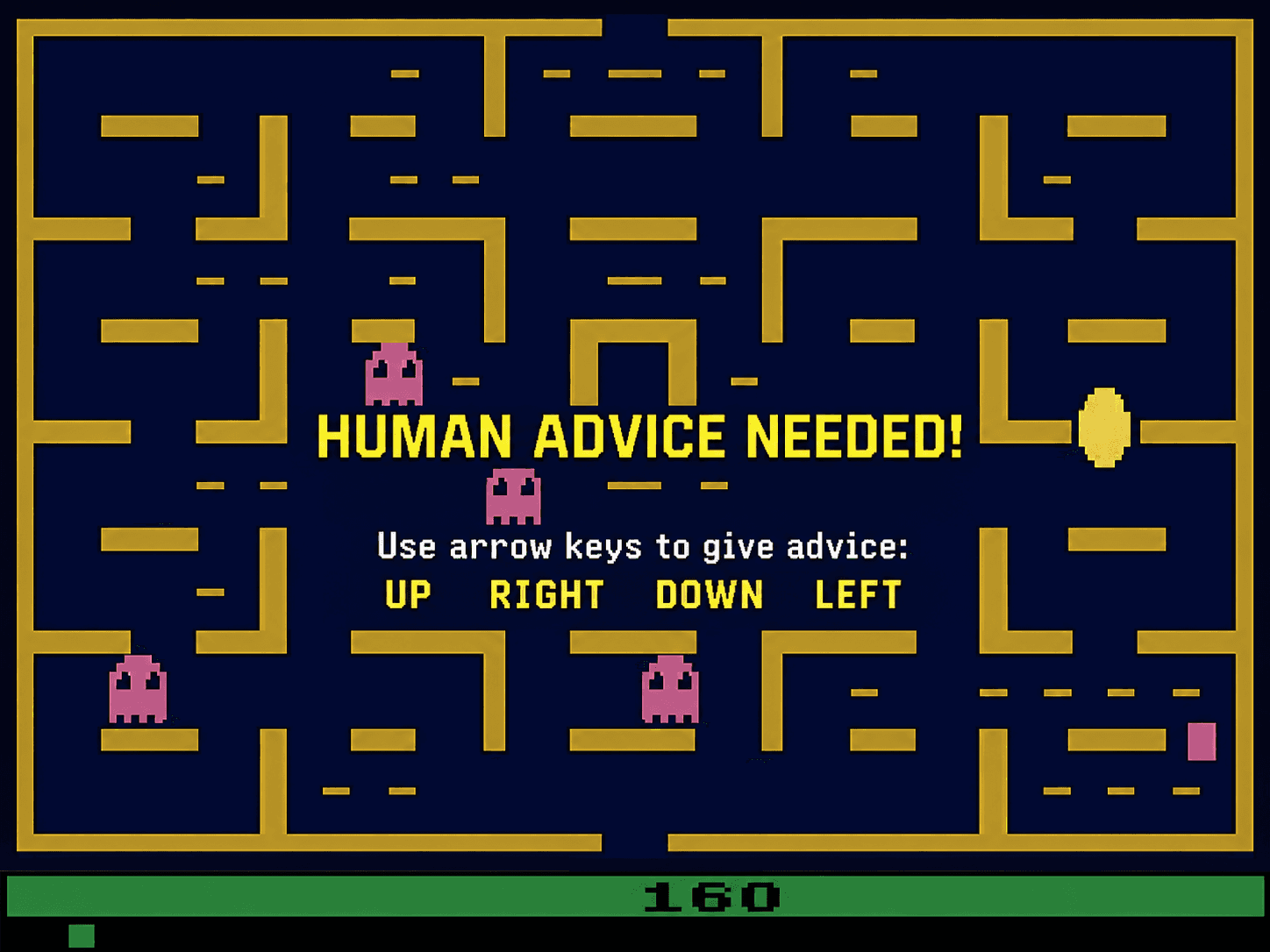
With the interaction structure defined, I collaborated with the programming team to translate the UX requirements into the functional research prototype. I helped define the interaction logic and system behaviour, supported the Python implementation, and used Cursor as an AI-assisted development tool to iterate on the interface and troubleshoot issues. The final prototype preserved the intended flow between autonomous AI behaviour, human advice requests, and high versus low-urgency response conditions.

We designed a Pac-Man-inspired arcade game where participants collaborated with an AI agent under high and low-urgency conditions. The interface kept users involved in the decision loop while allowing us to evaluate how urgency influenced trust, confidence, and sense of control. The study highlighted four UX principles: introduce AI collaboration gradually, preserve user agency, avoid unnecessary time pressure, and design for both trust and human confidence.
EXPERIMENT QUESTIONNAIRE
Evaluating the experience
After each condition, we asked participants to reflect on how the collaboration felt, not just how the system performed. The post-task questionnaire captured trust, self-confidence, ease of use, predictability, transparency, and perceived control, giving us a way to compare the high and low-urgency timed conditions alongside behavioural data.

Results
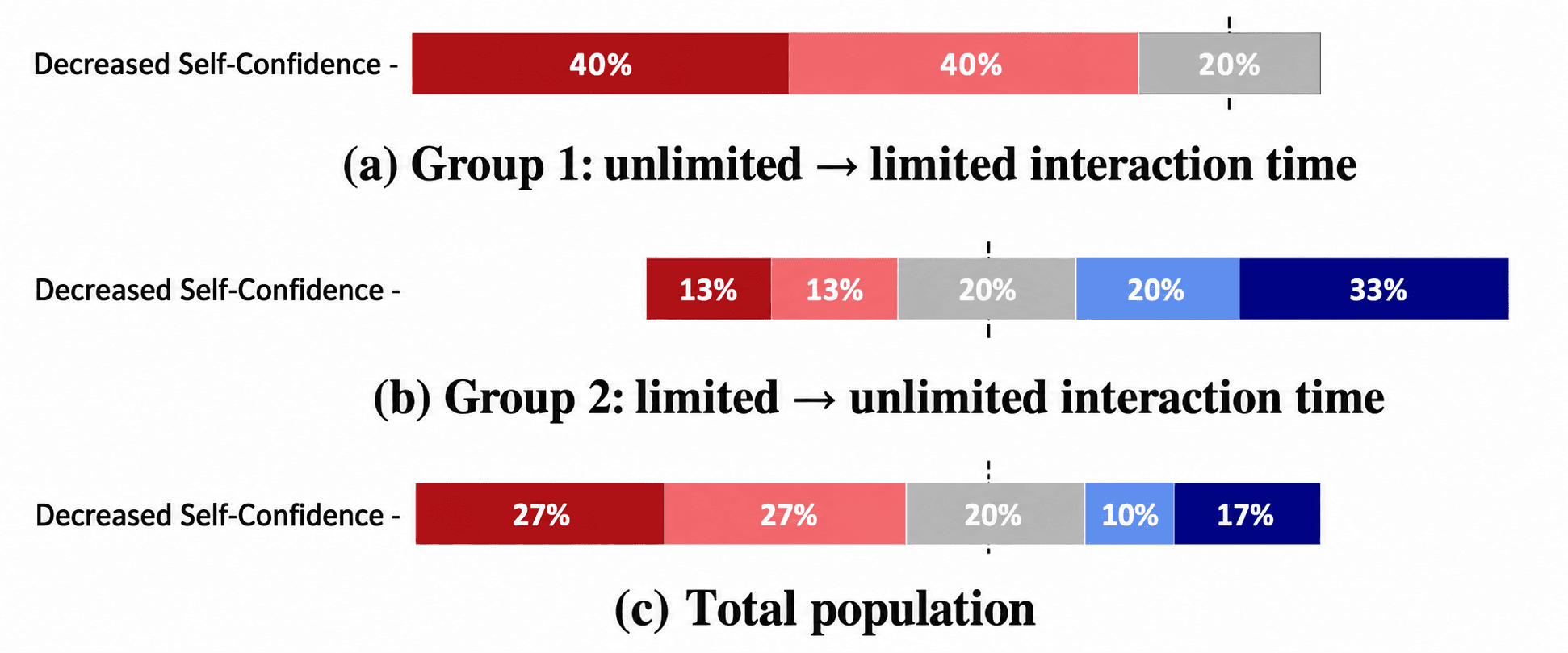
The study revealed a key UX tension: participants could trust the AI more while feeling less confident in their own contribution.
Trust generally increased after collaboration, but interaction order mattered. Among participants who experienced urgency first, 53.3% reported lower self-confidence. Participants introduced to the AI without time pressure did not report the same decline.
The main design implication is clear: onboard users gradually, avoid unnecessary urgency, and measure human confidence alongside trust in the AI.
Reflection & Impact
This project changed how I define successful Human–AI interaction. Higher trust in AI did not necessarily mean a better user experience. Participants could become more confident in the system while becoming less confident in their own contribution, revealing that trust alone is not enough to evaluate an AI experience.
The research surfaced an important design implication for AI products: design for appropriate trust, not maximum trust. Gradual onboarding, clear system behaviour, and preserving meaningful user control can help people understand when to rely on AI without diminishing their own agency.
From an industry perspective, these findings are relevant to teams designing AI assistants, decision-support tools, copilots, and other human-in-the-loop systems. They suggest that product teams should evaluate more than task completion or adoption, incorporating measures such as self-efficacy, perceived control, confidence, and qualitative feedback when assessing AI experiences.
The project also resulted in peer-reviewed research presented at HumanAISE, co-located with FSE 2026, extending the work beyond the prototype into the broader Human–AI and software-engineering research community.
The biggest takeaway: responsible AI UX should help people feel informed, capable, and meaningfully involved, not simply more dependent on the AI.
HumanAISE Workshop · FSE 2026
Next project
Robot Piano Tutor
